SkyeGate

Recognition, not passwords.

Members-only pages for your website.

Your members open private pages, posts and downloads with their Bothy pass. No passwords to share or reset. Works on WordPress. Your own pass, a token, an NFT or a tokenized share can all count.

harborclub.org/lounge
The Harbor ClubHome · Events · Lounge

The Roasters' Lounge

Single-origin drops, cupping notes and the roast calendar, for members with the pass.

Members only. Tap your pass to come in.
Open with my pass
harborclub.org/lounge

The Roasters' Lounge

Welcome back, roaster.This month's single origin: Yirgacheffe natural, cupping at 87. Member pricing locks Friday.
✓
Unlocked, no passwordMembers only

Watch a gate open.

Ninety seconds, all real: set who gets in, a visitor shows up, and the page opens the moment they are recognized.

SkyeGate demo video: recognition, not passwords 1:35

How it works

1

Give your members a pass

Set up your community in the Bothy dashboard and invite your people. Each member claims a pass with their email and a quick one-time code.

2

Lock the members-only part

Install SkyeGate on your WordPress site and wrap any page, post or download in one shortcode. That part now stays on your server.

3

Members walk right in

A member taps connect, proves it is really them, and the page opens. Everyone else sees a friendly door instead of your content.

What groups put behind the door

A members-only newsletter

Post each issue on your own site and let members read it there. Nobody passes a login around.

Team pages for families

Schedules, photos and contact sheets for the families on the team, kept off the open web.

A volunteer sign-up page

Put the sign-up form where only members can see it, so it reaches your people and not every passer-by.

A members' video library

Recordings of talks, classes or games, open to members and closed to everyone else.

Install to locked page in three screens

Real screens from a live WordPress site running SkyeGate Pro: a coffee shop putting its members’ lounge page behind recognition instead of a password.

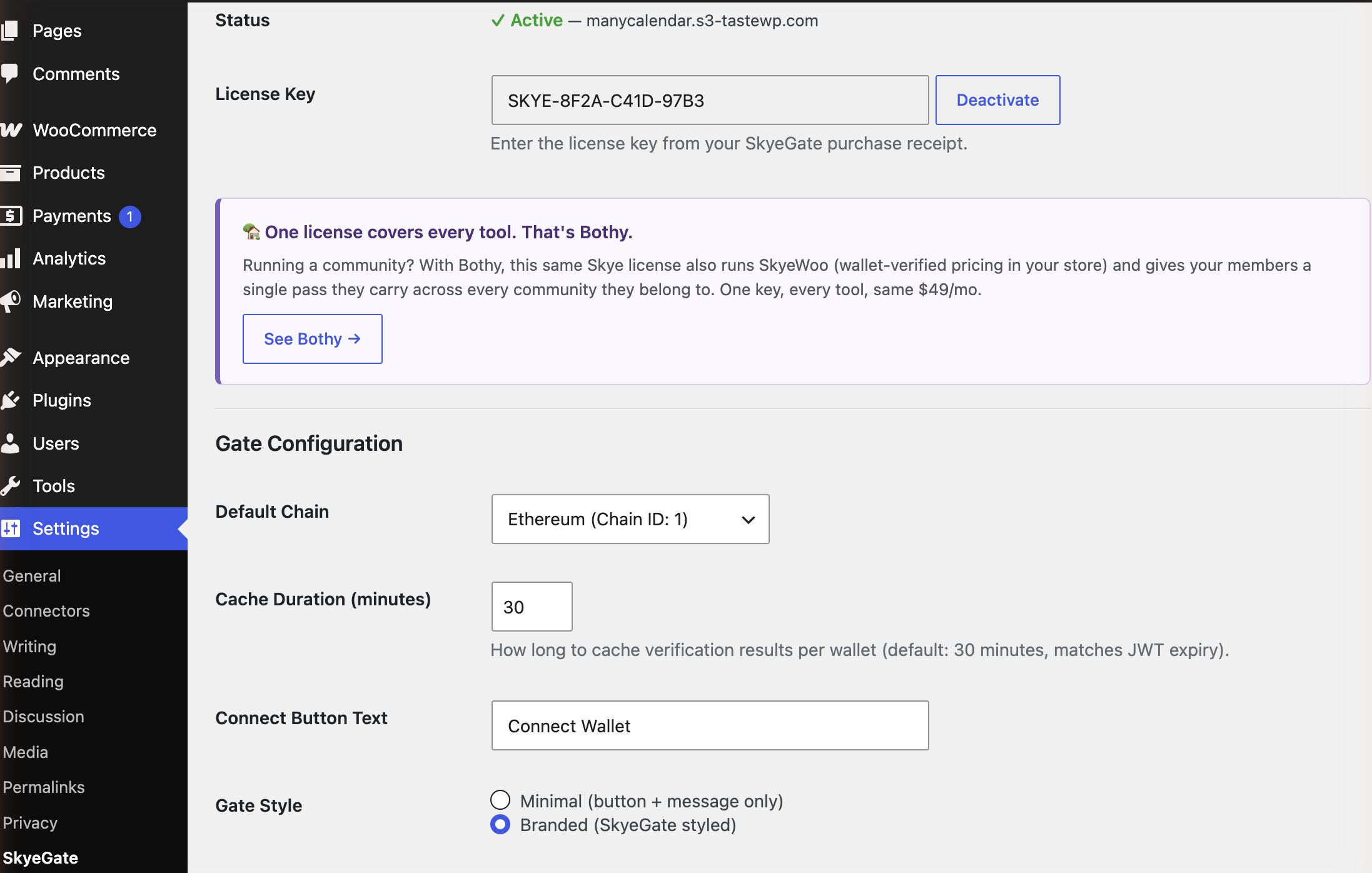
1Settings

Activate your license

Paste your license key into Settings → SkyeGate and it locks to your website. Tweak the button text if you like, and that’s the whole settings page.

Already run a Bothy community? Your Skye license already covers SkyeGate, and SkyeWoo for member prices in a WooCommerce store too.

yoursite.com/wp-admin
SkyeGate settings page with an active license, default chain, and gate style options
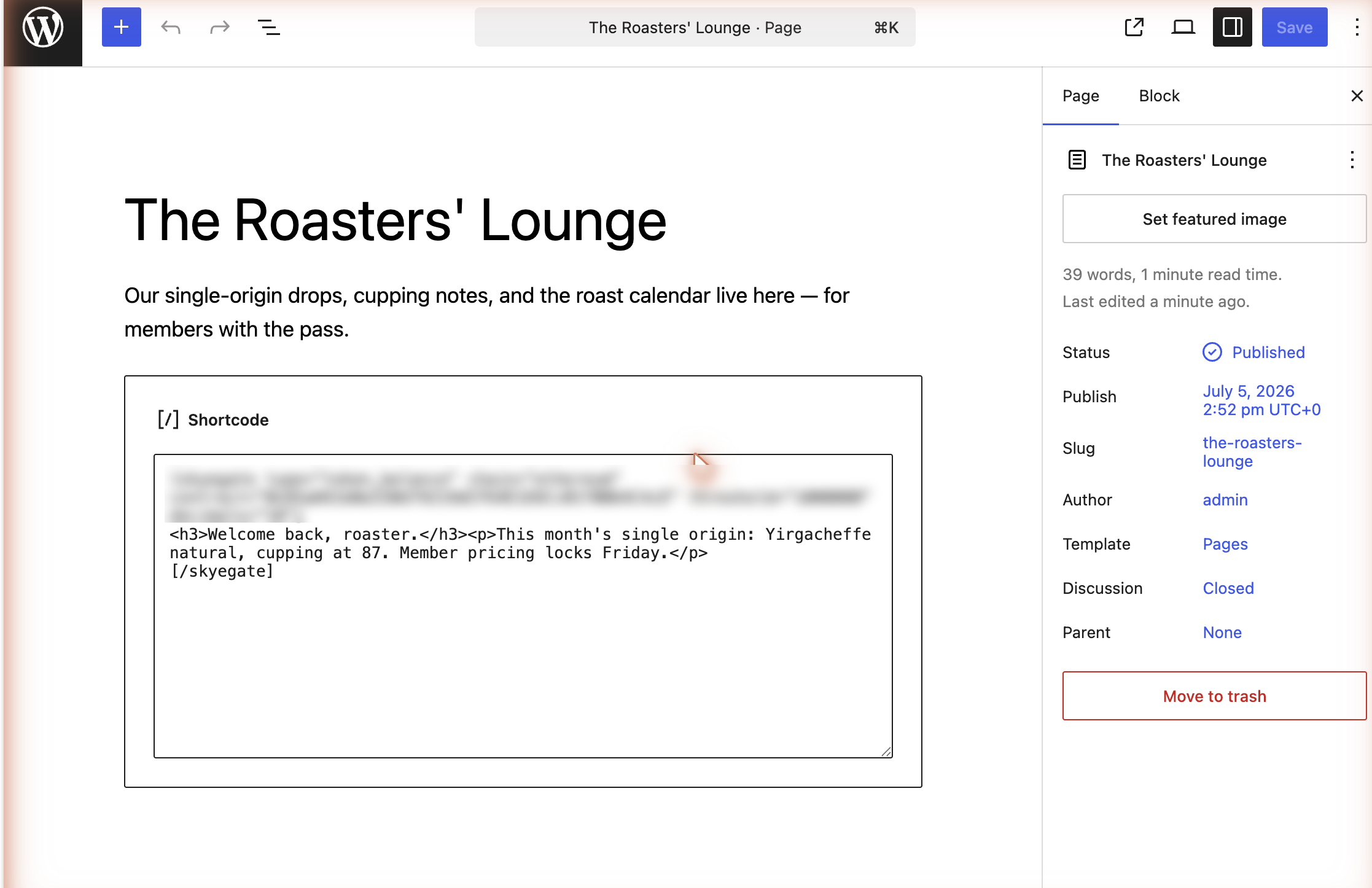
2The editor

Wrap anything in the gate

One shortcode around any content: a page, part of a post, an embed. Say who qualifies (members of your community) and what’s inside never leaves your server until a member shows up.

That’s all the setup there is. The blurred line is the rule saying who counts as a member. On Pro you can combine up to 10 rules on one page.

yoursite.com/wp-admin
WordPress editor with the skyegate shortcode wrapped around members-only content
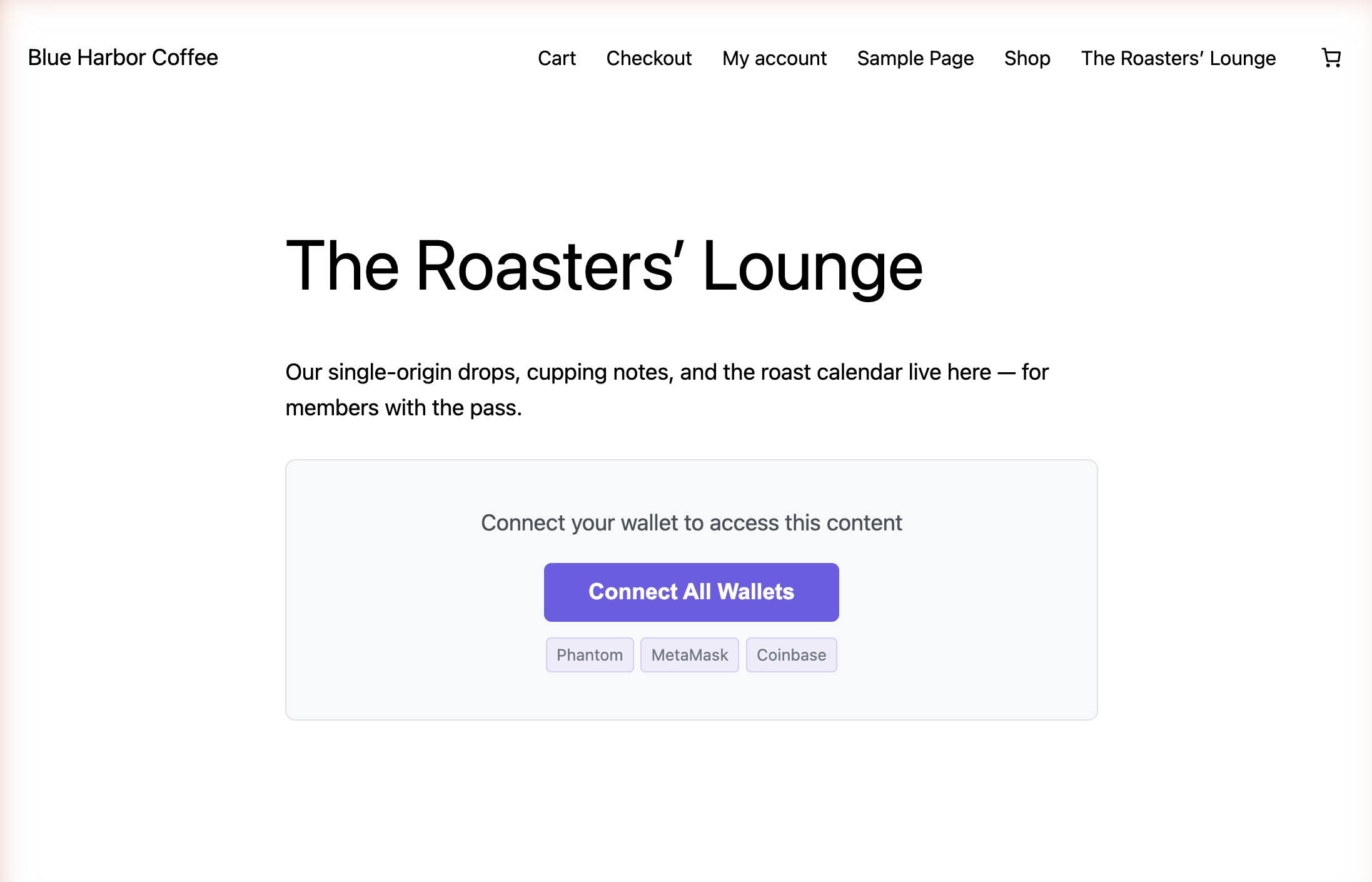
3The page

Visitors get a door, not a login

The published page greets visitors with one job: connect. No account to create, no password to forget, nothing to reset.

Recognition, not passwords.

yoursite.com/lounge
A live WordPress page locked by SkyeGate, showing the Connect All Wallets prompt
A laptop open to a club newsletter on a kitchen table

The club newsletter, for members only.

Pick the one that fits

Free on WordPress.org

SkyeGate Lite, $0

One rule per locked page, which is all you need for “members of our community.” No license, no account, and it updates itself like any other directory plugin.

Get the free plugin

Pro

$49 a month or $350 a year, or included in a Bothy Skye license

Combine up to 10 rules on one page. The same license runs SkyeWoo for member prices in a WooCommerce store, and works on Next.js sites too.

See Pro pricing

Pricing

Try Lite free from the WordPress directory. Upgrade to Pro for multi-condition gates, Farcaster identity gating, and the Vercel/Next.js SDK. Same SKYE key works on both stacks. Available worldwide, billed in US dollars.

Lite

Free

On WordPress.org, no license, no account

  • 1 condition per gate
  • 3 condition types: Token, NFT, EAS attestation
  • 32 blockchains
  • Server-side content protection
  • Multi-wallet connection
  • Cryptographically signed verification (ECDSA + JWKS)
  • Unlimited verified users

Pro

$49/mo

or $350/yr, save 40%

  • Works on WordPress (PHP plugin) and Vercel/Next.js (npm SDK): same key, two stacks
  • The same license runs SkyeWoo for member prices in your store
  • Up to 10 conditions per gate
  • 4 condition types: Token, NFT, EAS, Farcaster
  • All 34 blockchains (adds Tron, Sui and XDC Network; XRP Ledger is Lite only)
  • Every member proves the wallet is theirs before a door opens, on all 34 chains
  • Server-side content protection
  • Multi-wallet connection
  • Cryptographically signed verification (ECDSA + JWKS)
  • Unlimited verified users, no per-member fees

$49 a month or $350 a year. Renews automatically until you cancel. Cancel anytime from your account page; you keep access to the end of the period you paid for.

Building on Vercel / Next.js? See the SDK docs →

Already run a Bothy community? Don't buy this. SkyeGate is already part of your Skye license. Sign in to your dashboard and download the plugin: just paste your license key, no second purchase.
Download from your dashboard →

Why SkyeGate?

  • Works with your community's Bothy pass
  • Members-only content never leaves your server until a member arrives
  • No per-member fees: one flat price, as many members as you have
  • No passwords to share, reset or leak
  • Every check is signed, not guessed
  • No code: one shortcode around what you want to keep for members
See full comparison

Already have a license key?

Pro and Bothy members, go to your account to download the plugin (WordPress or Vercel/Next.js) and manage your license. One SKYE key, both stacks.
On Lite? It's free and needs no key, just install it from WordPress.org above.

Go to your account →

Frequently asked questions

Do my members need a crypto wallet?

No. Members claim their Bothy pass with their email and a quick one-time code, and open your pages the same way. People who already use a wallet app can use that instead.

Do I need to buy SkyeGate if I already run a Bothy community?

No. SkyeGate is already part of your Skye license. Sign in to your dashboard, download the plugin and paste your license key. No second purchase.

What’s the difference between the free plugin and Pro?

The free plugin (SkyeGate Lite) lives on WordPress.org and checks one rule per locked page, which covers “members of our community.” Pro lets you combine up to 10 rules on one page, runs SkyeWoo with the same license, and also works on Next.js. Pro is $49 a month or $350 a year, or included in a Bothy Skye license. The full technical comparison is on the developer page.

When someone leaves our group, how fast do they lose access?

Remove them in your Bothy dashboard and their pass is revoked. SkyeGate remembers each check for 30 minutes by default, so they are out within that window. You can make that shorter under Settings → SkyeGate.

Can someone peek at the members-only part?

No. The locked content stays on your server and is only sent to the browser after a member is recognized. It is not hidden in the page source.

I installed the plugin but nothing is happening

On Pro you need to activate both the plugin and the license key. After uploading the ZIP, click Activate Plugin. Then go to Settings → SkyeGate, paste your license key, and click Activate. The free plugin needs no key.

How do I update to a new version?

The same way you update any other WordPress plugin. Since version 1.9.3, SkyeGate checks skyemeta.com for new releases and shows the normal update notice on your Plugins screen when one is ready. With an active license it is a one-click update, and your settings and gates are kept.

Running something older than 1.9.3? That version cannot see updates yet, so do it once by hand: generate a fresh download link at skyemeta.com/account, then upload the new ZIP under Plugins → Add New → Upload Plugin and choose Replace current with uploaded. After that, updates arrive on their own. Your Plugins screen always shows the version you are on, and whether a newer one is waiting.

On the free tier there is nothing to do at all. SkyeGate Lite lives in the WordPress.org plugin directory, so it updates itself the way every directory plugin does.

I didn't receive my license key

Check your spam folder for an email from noreply@skyemeta.com. If you still can't find it, contact us with your purchase email.

Can I use my license on multiple sites?

Each license is locked to one domain. Deactivate in Settings → SkyeGate to move it. Multiple sites need separate subscriptions.

Can I use SkyeGate on a Next.js site?

Yes. SkyeGate Pro also ships as an npm package for Next.js, and the same license covers both. Hand your developer the SkyeGate for developers page and the SDK docs.

Can I use SkyeGate outside the United States?

Yes. SkyeGate is available worldwide. It runs on any WordPress or Next.js site in any country, and the wallets it recognizes are borderless by nature. Plans are billed in US dollars through Stripe, which accepts cards from most countries, and the price you see is the price you pay: no tax is added at checkout.

How do I cancel my subscription?

Go to skyemeta.com/account, enter your license key, and cancel through the billing portal. You keep access until the end of your billing period.

Building on Next.js, or gating by tokens, NFTs and chains? See SkyeGate for developers →

One membership. Recognized everywhere.

A community issues one pass. SkyeGate is where that pass unlocks your website content, alongside every other surface a member shows up: your store, the register, and the door.

Bothy issues → SkyeGate SkyeWoo Shopify In person Doors
See how the Recognition Network works ›

Ready to open the door for your members?

Give them pages worth opening, and recognition that can’t be shared, screenshotted or leaked.